製品を作るには、部品を購入して加工したり組み立てたりする必要があります。メーカーでは量産にあたって、この部品を表としてデータベースに登録しています。これがBOM(Bill of Material)です。SBOM(Software BOM)は、それのソフトウェア版です。ソフトウェアにおける”部品”は関数や関数を記述したファイルだと思いますが、SBOMで管理する部品は関数などではありません。使用するパッケージやライブラリです。関数は基本自作なのでSBOMで管理しないですが、ライブラリやパッケージは外部からインストールして使うので、これらをSBOMで管理します。特にOSS(Open Source Software)に関しては、ライセンス条項に注意しないと著作権違反になったり、自社のコア技術の流出になったりするリスクがあるので、きちんと管理する必要があります。
LabVIEWについては、LabVIEW自体が商用利用に課金が必須の開発環境なので、ほとんどがクローズドなライセンスです。詳細については「NI License Agreement(NLA)」の確認をお願いします。しかし、LabVIEWで使うすべてのものがNLAだけに従うわけではありません。VIパッケージマネージャーなどでインストールしたアドオンについては、独自のライセンスやOSSライセンスが付与されている場合があります。アドオンの種類によってはLGPLやGNUのような商用利用には厳しいものもあります。開発環境が有料のLabVIEWであってもSBOM管理は重要といえます。
そのSBOM管理に使えるファイルの作成機能がLabVIEW 2026 Q3に追加されました。今回はこれについて紹介したいと思います。
SBOM作成の前提条件
LabVIEWでSBOMを作成するには、LabVIEWプロジェクトでビルド仕様を作る必要があります。SBOMを作れるビルド仕様は次の通りです。
- アプリケーション
- ソースコード
基本的に人に配布するものが対象ですね。まあ、ZIPファイルではSBOM作成の項目はないですが。どちらの場合も作り方は同じです。今回はアプリケーションを作る場合のSBOMの作り方を紹介します。
SBOMの作り方
SBOMを作るには、Build Specificationで右クリック→Propertyでプロパティ画面を開き、Advancedにある「Generate Software Bill of Materials (SBOM) using the JKI Security Suite」を選びます。
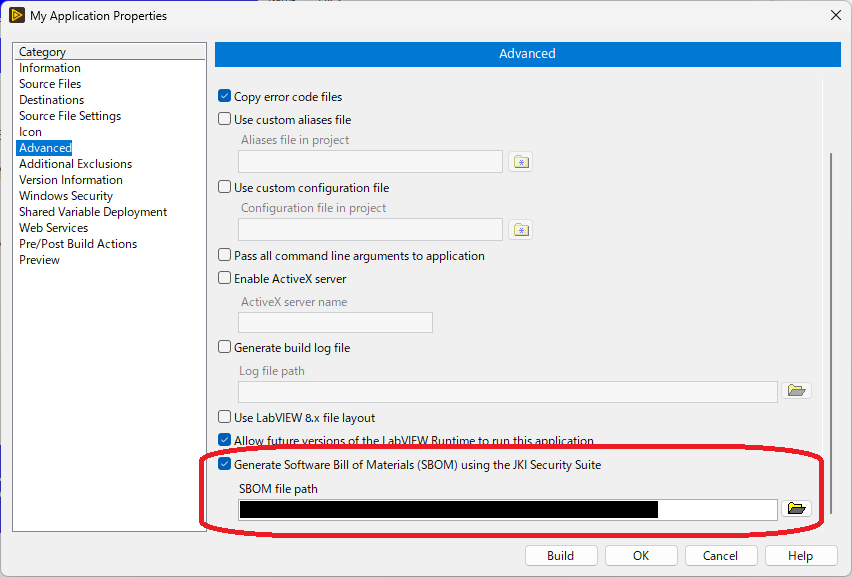
JKI Security Suiteが何なのかは私は把握していませんし、これを意図して入れたという認識はないので、LabVIEW 2026 Q3(以降?)にはデフォルトで入るものだと思われます。SBOM file pathは、Generate Software ~ にチェックを入れると勝手に入るので、こだわりがなければ特に変える必要はないです。これでOKを押してLabVIEWプロジェクトを保存してからビルドすると、SBOMのJSONファイルが生成されます。
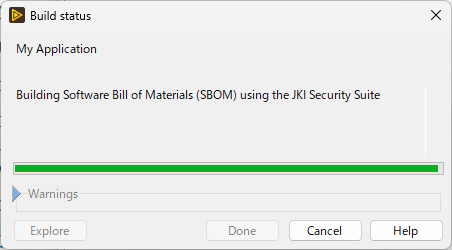
SBOMファイルの確認
今回のアプリケーションで使用しているパッケージは次の通りです。
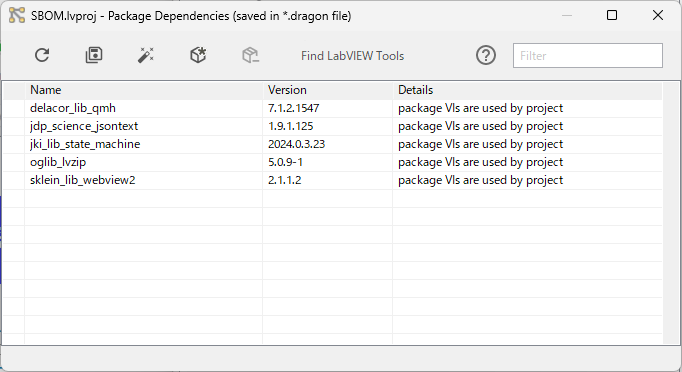
これはJKI Dragonのスキャンした結果で、VIパッケージマネージャー(VIPM)やNIパッケージマネージャー(NIPM)からインストールしたアドオンの管理ができます。…たぶん。今回はVIPMからインストールしたものしか使っていないので、これで全部です。これのSBOMファイルを見てみます。
ファイル名:SBOM_My Application.cdx.sbom.json *ビルド仕様で決めた名前。
展開するとSBOMのJSONファイルが見れます。
{
  "$schema": "http://cyclonedx.org/schema/bom-1.5.schema.json",
  "bomFormat": "CycloneDX",
  "components": [
    {
      "bom-ref": "pkg:nipkg/ni-labview-2026-vilib@26.3.0.49792-0%2Bf640",
      "description": "This is an infrastructure package for NI Software.",
      "externalReferences": [
        {
          "type": "website",
          "url": "https://www.ni.com"
        }
      ],
      "hashes": [
        {
          "alg": "MD5",
          "content": "246ec18df75eb2d1bf37435e8fd426d5"
        },
        {
          "alg": "SHA-256",
          "content": "f67a2aeeb33a66e2bdb9446fbf5b4060e911bb90750e6aef1167eb47eec64b06"
        }
      ],
      "licenses": [
        {
          "license": {
            "name": "NI Software License Agreement for Released Products"
          }
        }
      ],
      "name": "ni-labview-2026-vilib",
      "properties": [
        {
          "name": "vipm:display-name",
          "value": "NI LabVIEW (64-bit) VI Library"
        },
        {
          "name": "vipm:display-version",
          "value": "2026 Q3"
        }
      ],
      "purl": "pkg:nipkg/ni-labview-2026-vilib@26.3.0.49792-0%2Bf640",
      "supplier": {
        "contact": [
          {
            "email": "support@ni.com"
          }
        ],
        "name": "National Instruments"
      },
      "type": "library",
      "version": "26.3.0.49792-0+f640"
    },
    {
      "bom-ref": "pkg:vipm/delacor_lib_qmh@7.1.2.1547",
      "description": "The DQMH project template is based on the NI Queued Message Handler Project Template (NI QMH). The DQMH project template improves on the NI QMH by providing safe, event-based message handling and scripting tools to make development easy, encourage same style between different developers in the same project and improve efficiency. \n\nDQMH modules are best used in applications where there needs to be multiple modules running in parallel that communicate with each other. \n\nDQMH modules can also be used for applications that have a single module, where the developer would benefit from having an API Tester has the capability of eavesdropping on the different DQMH events and messages.\n\nThis package includes the Queue and Admin classes used by the DQMH modules.",
      "externalReferences": [
        {
          "type": "website",
          "url": "https://dqmh.org"
        }
      ],
      "hashes": [
        {
          "alg": "MD5",
          "content": "53e2301312e1bb0c8bfefc41f5a34e34"
        },
        {
          "alg": "SHA-256",
          "content": "fc6d688c1149060986140ade34878032920e51b30d9f30fd64423fadd09c60aa"
        }
      ],
      "licenses": [
        {
          "license": {
            "name": "Custom"
          }
        }
      ],
      "name": "delacor_lib_qmh",
      "properties": [
        {
          "name": "vipm:display-name",
          "value": "DQMH Framework: Palette"
        }
      ],
      "purl": "pkg:vipm/delacor_lib_qmh@7.1.2.1547",
      "supplier": {
        "name": "DQMH Consortium"
      },
      "type": "library",
      "version": "7.1.2.1547"
    },
    {
      "bom-ref": "pkg:vipm/jdp_science_jsontext@1.9.1.125",
      "description": "JSONtext is a library intended to make working with JSON in LabVIEW easy, fast and flexible.  It is based on high-speed text parsing, and does not involve any kind of intermediate representation of the JSON (the only thing passed between functions are JSON text strings).  \n\nSupports searching for elements in the JSON using JSON Path notation (example '$.Users[*].Name').  \n\nExtensive support for converting to/from LabVIEW types.  Can use <JSON> tag in cluster element names to identify strings that should retain JSON format.  \n\nAllows formating JSON using \"Pretty Print\".  Suppost validation with JSON Schema.  Included higher-order functions for using JSON as Config Files.\n\nAs extension to standard JSON, will allow Comments.  \n\n<b>Note:</b> On Windows 10, it may be necessary to run VI Package Manager \"as an administrator\" in order to install the VI Package.",
      "externalReferences": [
        {
          "type": "website",
          "url": "https://lavag.org/files/file/294-jsontext/"
        }
      ],
      "hashes": [
        {
          "alg": "MD5",
          "content": "1eb6255ec31ab431fe7da7aa2a4beeac"
        },
        {
          "alg": "SHA-256",
          "content": "d80914ad44992a5bf2d895439ce87a948475e492a9652a878ed691d541ddb082"
        }
      ],
      "licenses": [
        {
          "license": {
            "id": "BSD-3-Clause"
          }
        }
      ],
      "name": "jdp_science_jsontext",
      "properties": [
        {
          "name": "vipm:display-name",
          "value": "JSONtext"
        }
      ],
      "purl": "pkg:vipm/jdp_science_jsontext@1.9.1.125",
      "supplier": {
        "name": "JDP Science"
      },
      "type": "library",
      "version": "1.9.1.125"
    },
    {
      "bom-ref": "pkg:vipm/jki_lib_state_machine@2024.0.3.23",
      "description": "The JKI State Machine is a template you can use for quickly creating your own LabVIEW applications. This is the very same template that is used by the JKI team, nearly every day, and is the result of years of refinement by our team of LabVIEW experts. We encourage you to post any questions or comments to the JKI Software Forums. There you will find an active community of JKI software users, as well as JKI team members.\r\n\r\nHow to use:\r\n\r\nFind the JKI State Machine in the palettes\r\n1) Functions >> JKI Toolkits >> JKI State Machine\r\n\r\nUse QuickDrop to place a JKI State Machine on the block diagram\r\n1)  Press Control+Space then type \"JKI\"\r\n2) choose the \"JKI State Machine\" option that appears\r\n\r\nLaunch the JKI State Machine Explorer by either\r\nA) Right-click on a State String, Case Structure, or Event Structure to launch JKI SM Editor\r\nB) Press Control+Space then Control+J when you're on the block diagram of a VI containing a JKI SM\r\n\r\n\r\nUsing the Right-click menu on the JKI SM Parts for increased productivity:\r\n- Select an item in the tree to make that frame visible\r\n- Click back and forward to navigate the history\r\n- Drag and drop frames to reorganize the order\r\n- Right-click on items in the tree-view to rename, duplicate, delete, etc.\r\n- Right-click on a state string and choose Goto State Frame to jump to that frame of the JKI SM.\r\n- Right click on a state string or frame and choose Find Callers to find all callers of a state\r\n- Right-click on a bundle or unbundle by name and choose Find Data Accessors to find all accessors of the data.\r\n\r\nSpecial thanks to Jim Carmody for open sourcing his CaseSelect tool as a launching off point for the JKI SM Editor.",
      "externalReferences": [
        {
          "type": "website",
          "url": "http://jki.net/state-machine/"
        }
      ],
      "hashes": [
        {
          "alg": "MD5",
          "content": "58d05fd50ecd54c4f1bfc05d47064f61"
        },
        {
          "alg": "SHA-256",
          "content": "b477f7e8efe99771ab6d74279bc353b652ff0fc7b314640b9553d5077b7d7287"
        }
      ],
      "licenses": [
        {
          "license": {
            "id": "BSD-3-Clause"
          }
        }
      ],
      "name": "jki_lib_state_machine",
      "properties": [
        {
          "name": "vipm:display-name",
          "value": "JKI State Machine"
        }
      ],
      "purl": "pkg:vipm/jki_lib_state_machine@2024.0.3.23",
      "supplier": {
        "name": "JKI"
      },
      "type": "library",
      "version": "2024.0.3.23"
    },
    {
      "bom-ref": "pkg:vipm/sklein_lib_webview2@2.1.1.2",
      "description": "This package provides wrappers around the WebView2 .NET Control.\r\n\r\nThe needed library from nuget is included. Please see the LICENSE.txt for lincensing information regarding the webview2 nuget package.\r\n\r\nThe wrapper exposes a few useful events, methods and properties. It comes in three flavors:\n\r* A LabVIEW class which manages a wrapper around a webview2 instance (This package, preferred)\n* A QControl for advanced usage (package WebView2 QControl)\n* A XControl which exposes the wrapper as a ready to use control (package WebView2 XControl).\n\r\nFeatures:\r\n- Drop in browser control\r\n- customizable paths and environment options\r\n- Javascript execution with result\r\n- WebMessage sending and reception through events\r\n- Content by URI or raw HTML\r\n- Status Events\n- PDF printing\n- Update wizard for webview2 assemblies from nuget (Tools->WebView2)\n\nHint:\nWebView2 is required to be run in the UI-thread, so heavy interaction with it may reduce the performance of your UI",
      "externalReferences": [
        {
          "type": "website",
          "url": "https://github.com/kleinsimon/LV-WebView2"
        }
      ],
      "hashes": [
        {
          "alg": "MD5",
          "content": "7ac7b97a48df721edbd5bbae58e1ceab"
        },
        {
          "alg": "SHA-256",
          "content": "09852eb8b9f83a6e5981341cb54b761504307fbcfcd0d1adf24b9dadf9a73ffe"
        }
      ],
      "licenses": [
        {
          "license": {
            "name": "BSD-3"
          }
        }
      ],
      "name": "sklein_lib_webview2",
      "properties": [
        {
          "name": "vipm:display-name",
          "value": "WebView2"
        }
      ],
      "purl": "pkg:vipm/sklein_lib_webview2@2.1.1.2",
      "supplier": {
        "name": "sklein"
      },
      "type": "library",
      "version": "2.1.1.2"
    }
  ],
  "dependencies": [
    {
      "dependsOn": [
        "pkg:nipkg/ni-labview-2026-vilib@26.3.0.49792-0%2Bf640",
        "pkg:vipm/delacor_lib_qmh@7.1.2.1547",
        "pkg:vipm/jdp_science_jsontext@1.9.1.125",
        "pkg:vipm/jki_lib_state_machine@2024.0.3.23",
        "pkg:vipm/sklein_lib_webview2@2.1.1.2"
      ],
      "ref": "pkg:vipm/My-Application@1.0.0.4"
    }
  ],
  "metadata": {
    "component": {
      "bom-ref": "pkg:vipm/My-Application@1.0.0.4",
      "name": "My Application",
      "supplier": {
        "name": "勤め先"
      },
      "type": "application",
      "version": "1.0.0.4"
    },
    "timestamp": "2026-08-27T12:14:38.525Z",
    "tools": {
      "components": [
        {
          "name": "vipm-cli",
          "publisher": "JKI",
          "type": "application",
          "version": "26.3.1"
        },
        {
          "name": "VIPM Desktop",
          "publisher": "JKI",
          "type": "application",
          "version": "2026.3.1"
        },
        {
          "description": "LabVIEW 2026 Q3 (64-bit)",
          "name": "LabVIEW",
          "properties": [
            {
              "name": "vipm:labview:bitness",
              "value": "64"
            }
          ],
          "publisher": "National Instruments",
          "type": "application",
          "version": "26.3.0"
        },
        {
          "name": "NI Package Manager",
          "publisher": "National Instruments",
          "type": "application",
          "version": "26.5.0f145"
        }
      ]
    }
  },
  "serialNumber": "urn:uuid:4bac8128-4f60-40b0-9676-cf436011f711",
  "specVersion": "1.5",
  "version": 1
}
…なぜか私の勤め先情報がSupplier項目に入っていました。プライベートのNIアカウントでインストールしたLabVIEW Communityでビルドしたはずですが…プライベートのNIアカウントと企業用のアカウントを紐づけたからかな?ビルド情報に会社名が書かれていたからかな(勝手に記入されていました)?そこだけは実際のものから書き換えました。ほかはJSONファイルのコピーペーストです。長いので適当なパッケージを1つ見てみます。
 {
      "bom-ref": "pkg:vipm/jki_lib_state_machine@2024.0.3.23",
      "description": "The JKI State Machine is a template you can use for quickly creating your own LabVIEW applications. This is the very same template that is used by the JKI team, nearly every day, and is the result of years of refinement by our team of LabVIEW experts. We encourage you to post any questions or comments to the JKI Software Forums. There you will find an active community of JKI software users, as well as JKI team members.\r\n\r\nHow to use:\r\n\r\nFind the JKI State Machine in the palettes\r\n1) Functions >> JKI Toolkits >> JKI State Machine\r\n\r\nUse QuickDrop to place a JKI State Machine on the block diagram\r\n1)  Press Control+Space then type \"JKI\"\r\n2) choose the \"JKI State Machine\" option that appears\r\n\r\nLaunch the JKI State Machine Explorer by either\r\nA) Right-click on a State String, Case Structure, or Event Structure to launch JKI SM Editor\r\nB) Press Control+Space then Control+J when you're on the block diagram of a VI containing a JKI SM\r\n\r\n\r\nUsing the Right-click menu on the JKI SM Parts for increased productivity:\r\n- Select an item in the tree to make that frame visible\r\n- Click back and forward to navigate the history\r\n- Drag and drop frames to reorganize the order\r\n- Right-click on items in the tree-view to rename, duplicate, delete, etc.\r\n- Right-click on a state string and choose Goto State Frame to jump to that frame of the JKI SM.\r\n- Right click on a state string or frame and choose Find Callers to find all callers of a state\r\n- Right-click on a bundle or unbundle by name and choose Find Data Accessors to find all accessors of the data.\r\n\r\nSpecial thanks to Jim Carmody for open sourcing his CaseSelect tool as a launching off point for the JKI SM Editor.",
      "externalReferences": [
        {
          "type": "website",
          "url": "http://jki.net/state-machine/"
        }
      ],
      "hashes": [
        {
          "alg": "MD5",
          "content": "58d05fd50ecd54c4f1bfc05d47064f61"
        },
        {
          "alg": "SHA-256",
          "content": "b477f7e8efe99771ab6d74279bc353b652ff0fc7b314640b9553d5077b7d7287"
        }
      ],
      "licenses": [
        {
          "license": {
            "id": "BSD-3-Clause"
          }
        }
      ],
      "name": "jki_lib_state_machine",
      "properties": [
        {
          "name": "vipm:display-name",
          "value": "JKI State Machine"
        }
      ],
      "purl": "pkg:vipm/jki_lib_state_machine@2024.0.3.23",
      "supplier": {
        "name": "JKI"
      },
      "type": "library",
      "version": "2024.0.3.23"
    }
これはJKI State Machineについての項目です。いろいろ情報がありますが、重要なのは”license”ですね。JKI State Machineのライセンスは”BSD-3-Clause”であることが分かります。比較的商用利用しやすいですね。
"dependencies": [
    {
      "dependsOn": [
        "pkg:nipkg/ni-labview-2026-vilib@26.3.0.49792-0%2Bf640",
        "pkg:vipm/delacor_lib_qmh@7.1.2.1547",
        "pkg:vipm/jdp_science_jsontext@1.9.1.125",
        "pkg:vipm/jki_lib_state_machine@2024.0.3.23",
        "pkg:vipm/sklein_lib_webview2@2.1.1.2"
      ],
      "ref": "pkg:vipm/My-Application@1.0.0.4"
    }
  ]
…あれ?パッケージが1つ足りないですね。今回は「oglib_lvzip」(OpenG LabVIEW ZIP Library)というパッケージを使用していますが、それがSBOMにはないですね。JKI DragonのPackage Dependenciesにはあるので、アプリケーションには間違いなく含まれていますが…。実はOpenG LabVIEW ZIP Libraryのライセンスは面倒なもので、VI部分はBSDですが、この中で使っている共有ライブラリ(Windowsならdll)のライセンスがLGPLです。LGPLならソースコードを全部開示まではいかなくても、ライブラリの改変をエンドユーザーができるようにしないといけないので、取り扱いに注意です。これがSBOMで拾えていないのはバグでしょうか?OpenGが古くからあるもので何か新しい機能に対応していないのかもしれませんが、SBOM生成で拾えるようになってほしいですね。
→このバグはVIPM 2026 Q3 f2で修正されました。追記2を参照いただければと思います。
注意点
LabVIEW 2026 Q3で追加されたSBOM生成で注意することがいくつかあります。
VIサーバでTCP接続できるか確認する
SBOMの作成にはJKI Security Suiteというものが利用されています。LabVIEWの外からLabVIEWにアクセスして作る感じだと思います。なので、VIサーバを使えるようにする必要があります。LabVIEWをインストールしたままのデフォルトの状態ではこれが無効になっています。Tool→Optionでオプション画面を開き、VI ServerからTCP/IPにチェックを入れて有効にします。
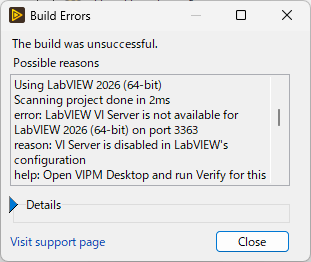
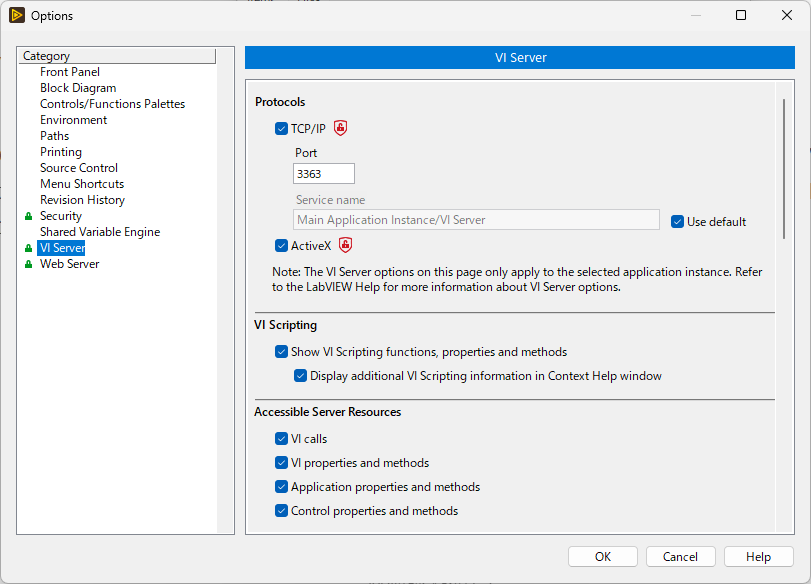
あと、SBOM生成でTCP/IPのポートを3363から変えても作成できる方法が分かりませんでした。複数バージョンのLabVIEWを使っていて、各バージョンでTCP/IPのポート番号を変えている人は注意する必要があります。
LabVIEWプロジェクトを保存する
プロジェクトを保存しないとSBOM作成時にエラーが発生する場合があるようです。
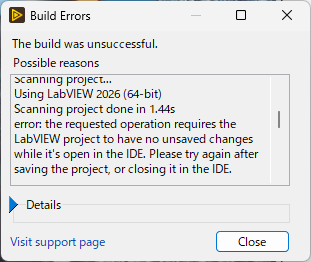
少し触った感じでは、このエラーが必ず発生するわけではないみたいですが、ビルド直前に保存するに越したことはないですね。
それと、最近のLabVIEW(2024年か2025年あたりから?)では、JKI Dragonでプロジェクト内で使用するパッケージの管理ができますが、SBOM作成にはJKI Dragonは必須ではないようです。
感想
LabVIEWとOSSは無縁のように思えますが、実はそうでもないです。なので、自動でSBOMを生成する機能が追加されたのは助かります。ただ、拾えていないパッケージもあるので → 拾えるようになりましたが、それでも人の確認は必要ですね。あと、JKI Security SuiteとLabVIEWをつなぐポート設定をどうやるか分かりませんでした。少なくともVIPMとは別の設定っぽいです。いずれにしても、今後は積極的に使っていきたいですね。
追記:SBOMファイルにリストされないパッケージがある件について
SBOMファイルに一部パッケージがリストされない件について日本NIに問い合わせたところ、NIの開発やJKIで調査することになり、次の返事をもらいました。
“This was an issue with library calls that use wildcarding in their names, e.g.
library.*instead oflibrary.dllorlibrary.so.”
ライブラリ (dllなど) を呼び出すときにワイルドカード (*) を使っているとSBOM生成でバグるようです。
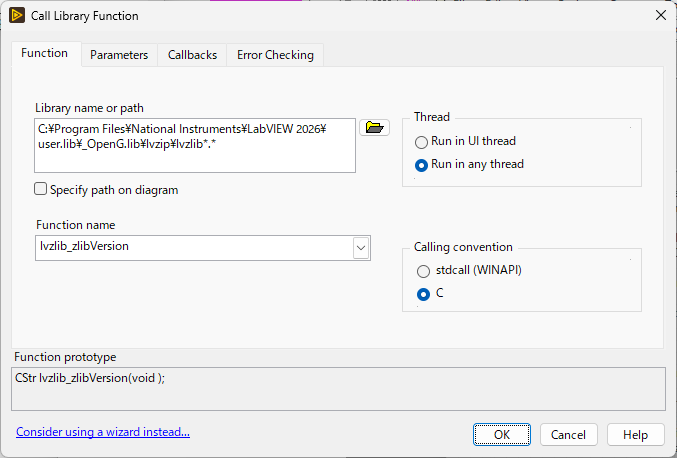
…確かに「lvzip*.*」を呼び出していますね。WindowsでもLinuxでも同じVIを利用できるように拡張子やOSビット数のところを*にするのはよくあることだと思います。この件については近い将来対応するとのことです。
現時点では、SBOMファイルを手で修正するか、SBOM Helperで対応できるようです。
SBOM Helper
SBOM HelperというのはSBOMの確認や編集を行うためのツールのようです。
JKI Security Suite SBOM Helper:SBOM Helper Desktop App – Developer Docs
試しにこれをインストールして、今回作ったSBOMを開いてみます。
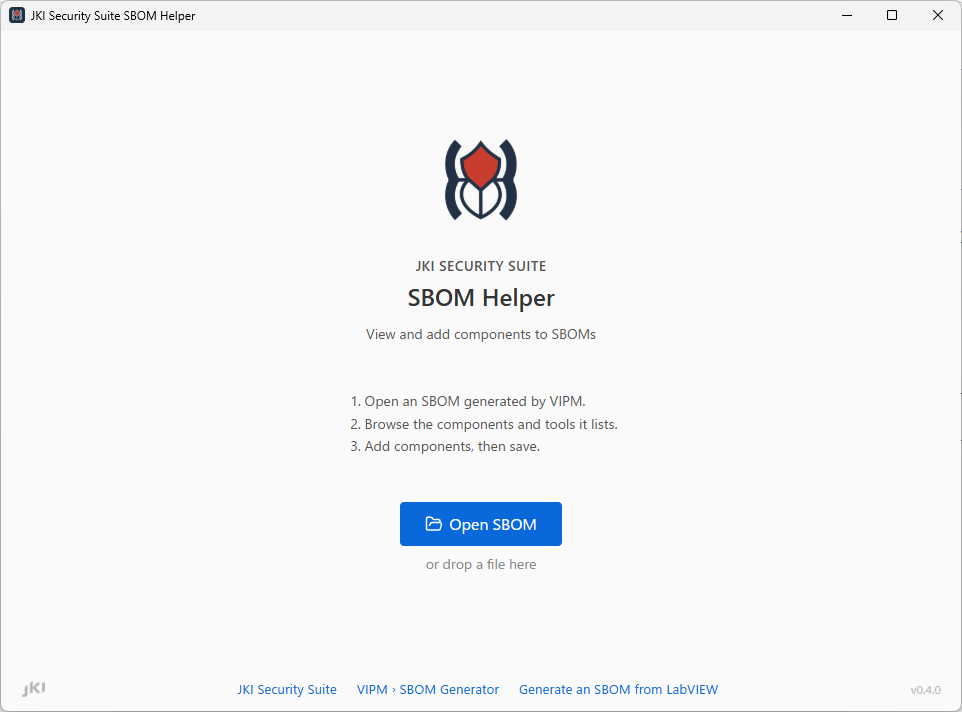
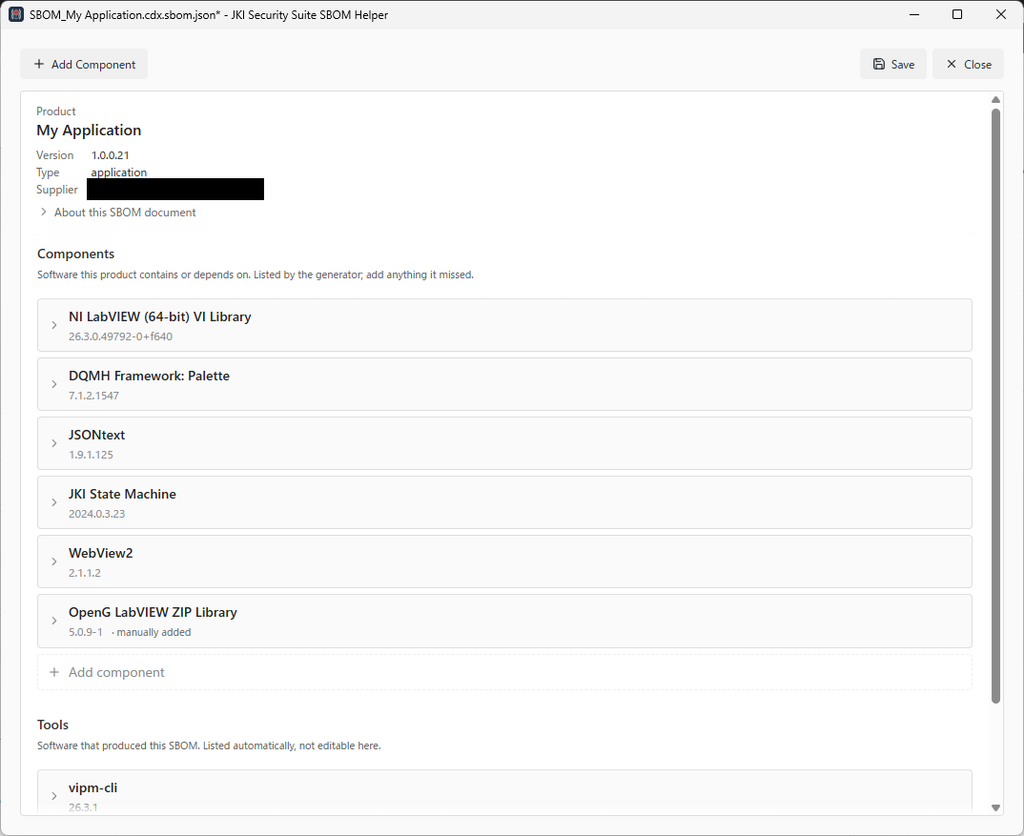
上のほうにあるSupplierはこのアプリケーションのSupplierで、勤め先が入っていたので隠しました。上のほうに「Add Component」とある(下にもある)ので、追加してみます。
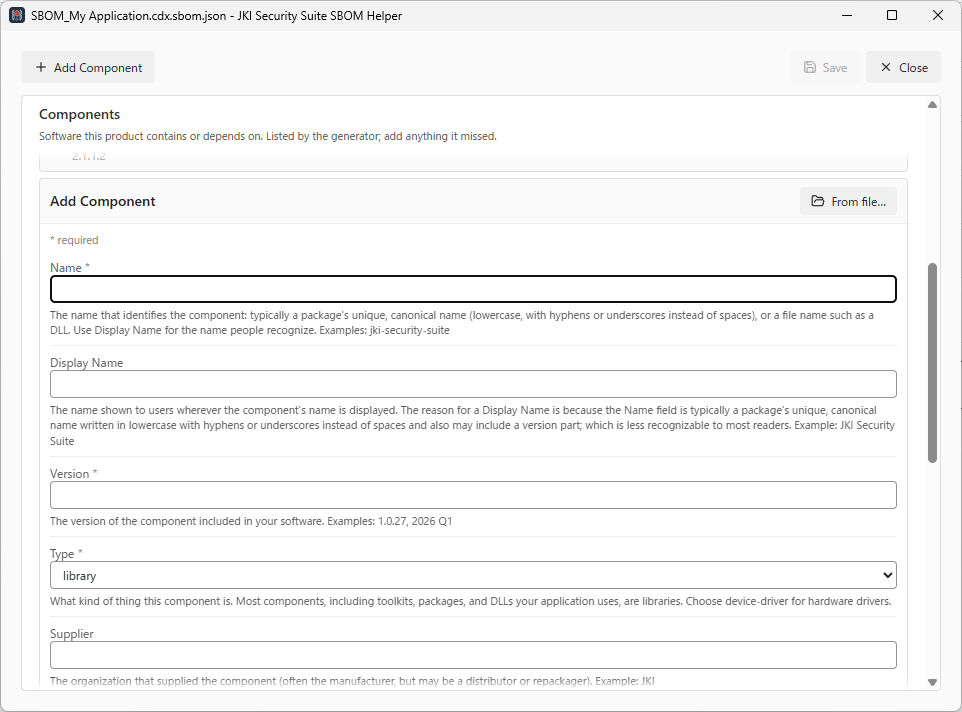
これは手入力で追加する感じですね。「From file…」というボタンがあります。最初はここからvipcを選ぶと読み取ってくれると思いましたが、ここではdllやexeなどを選ぶようです。今回はVIパッケージマネージャの情報を手入力で記入して、SBOMファイルを更新します。
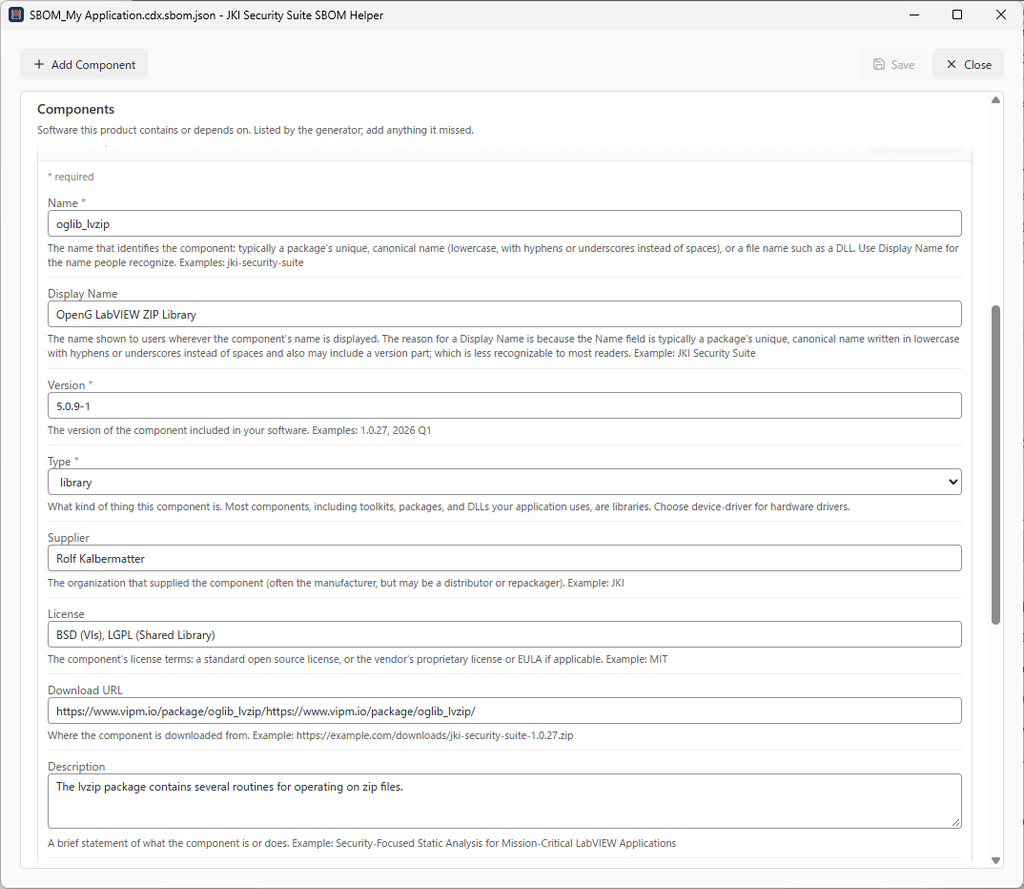
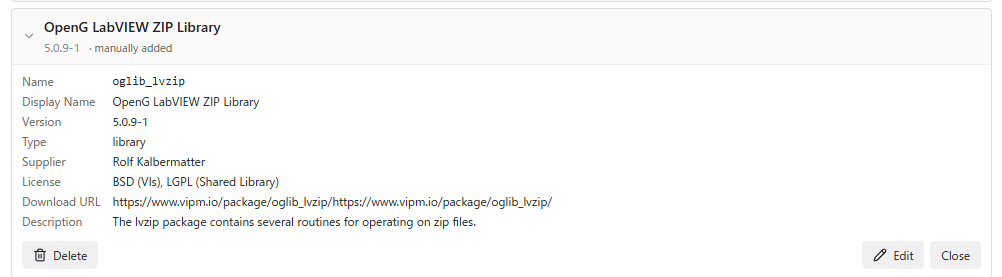
{
      "bom-ref": "vipm:custom/oglib_lvzip@5.0.9-1",
      "description": "The lvzip package contains several routines for operating on zip files.",
      "externalReferences": [
        {
          "type": "distribution",
          "url": "https://www.vipm.io/package/oglib_lvzip/https://www.vipm.io/package/oglib_lvzip/"
        }
      ],
      "licenses": [
        {
          "license": {
            "name": "BSD (VIs), LGPL (Shared Library)"
          }
        }
      ],
      "name": "oglib_lvzip",
      "properties": [
        {
          "name": "vipm:component:source",
          "value": "jki-sbom-helper"
        },
        {
          "name": "vipm:display-name",
          "value": "OpenG LabVIEW ZIP Library"
        }
      ],
      "supplier": {
        "name": "Rolf Kalbermatter"
      },
      "type": "library",
      "version": "5.0.9-1"
    }
  ],
  "dependencies": [
    {
      "dependsOn": [
        "pkg:nipkg/ni-labview-2026-vilib@26.3.0.49792-0%2Bf640",
        "pkg:vipm/delacor_lib_qmh@7.1.2.1547",
        "pkg:vipm/jdp_science_jsontext@1.9.1.125",
        "pkg:vipm/jki_lib_state_machine@2024.0.3.23",
        "pkg:vipm/sklein_lib_webview2@2.1.1.2",
        "vipm:custom/oglib_lvzip@5.0.9-1"
      ],
      "ref": "pkg:vipm/My-Application@1.0.0.21"
    }
  ],
保存したら、OpenG LabVIEW Zip Libraryが追加されました。これを使えば、今回のような欠落したものや、VIPM/NIPMを介さずに持ってきたOSSも追加できますね。
追記2:VIPM 2026 Q3 f2のアップデート
VIPM 2026 Q3がアップデートされました。
アップデート内容:VIPM 2026 Q3 f2 – Developer Docs
アップデート内容の中に、次のものがありました。
OpenG-format packages in SBOMs: SBOM generation now reads packages correctly when they use the OpenG package format or have a release-suffixed version, like
oglib_lvzip 5.0.9-1, and lists them in the SBOM with license, supplier, and hashes; previously it reported them as not installed or as a version mismatch and could leave them out of the SBOM. See issue #151.
oglib_lvzip 5.0.9-1が例として挙げられているのを見ると、この記事で取り上げた内容について対応したものと考えられます。実際にVIPMをアップデートしてSBOMを作ってみました。
冒頭省略

{
      "bom-ref": "pkg:vipm/oglib_lvzip@5.0.9-1",
      "description": "The lvzip package contains several routines for operating on zip files.\r\n",
      "externalReferences": [
        {
          "type": "website",
          "url": "http://wiki.openg.org/oglib_lvzip"
        }
      ],
      "hashes": [
        {
          "alg": "MD5",
          "content": "777dcc49eebb8062cd69eb0db806df1a"
        },
        {
          "alg": "SHA-256",
          "content": "7446417214ef910d916e3285c84ddefed1b385f3d6051690a89fcee7be2bffe6"
        }
      ],
      "licenses": [
        {
          "license": {
            "name": "BSD (VIs), LGPL (Shared Library)"
          }
        }
      ],
      "name": "oglib_lvzip",
      "properties": [
        {
          "name": "vipm:display-name",
          "value": "OpenG LabVIEW ZIP Library"
        },
        {
          "name": "vipm:component:source",
          "value": "project-scan"
        }
      ],
      "purl": "pkg:vipm/oglib_lvzip@5.0.9-1",
      "supplier": {
        "name": "OpenG.org"
      },
      "type": "library",
      "version": "5.0.9-1"
    }

中略

"dependencies": [
    {
      "dependsOn": [
        "pkg:nipkg/ni-labview-2026-vilib@26.3.0.49792-0%2Bf640",
        "pkg:vipm/delacor_lib_qmh@7.1.2.1547",
        "pkg:vipm/jdp_science_jsontext@1.9.1.125",
        "pkg:vipm/jki_lib_state_machine@2024.0.3.23",
        "pkg:vipm/oglib_lvzip@5.0.9-1",
        "pkg:vipm/sklein_lib_webview2@2.1.1.2"
      ],
      "ref": "pkg:vipm/My-Application@1.0.0.22"
    }
  ]

省略
OpenG LabVIEW ZIP Libraryがちゃんといますね。